
12 KiB
🛠️ TASK MANAGER — CLOUD SYSTEM DEPLOYMENT
☁️ Course: Cloud Technologies & Web Application Deployment



🚀 Live Production Website: https://taskmanager-gs699he.swedencentral.cloudapp.azure.com
🎓 Academic & System Metadata
| Student Identity | Platform Credentials | Academic Institution |
|---|---|---|
| Name: Gopikanta Shill Login: gs699heDate: May 19, 2026 |
Cloud: Microsoft Azure (Azure for Students) Region: swedencentralInstance Type: Standard_B2ts_v2 |
University: Technical University of Košice Department: KEMT FEI Repository: zkt25 & zkt26 |
📖 Application Description
The Task Manager is an enterprise-grade, high-performance web application designed for personal productivity. It features:
- ✨ Apple-inspired UI: Sleek glassmorphism style with light/dark adaptive layout and micro-animations.
- 🚀 High-Speed API: Powered by Node.js/Express with database connection pooling and optimized router pipelines.
- ⚡ Redis Caching: Transparent query caching (30s TTL) with instant write invalidation.
- 🔒 Automated Security: Automatic HTTPS certificate management and VM hardening out of the box.
🏗️ Visual Topology & Network Architecture
The architecture is deployed to Microsoft Azure using an Azure for Students subscription and runs entirely inside an isolated, double-network container segment.
🖼️ Topology Layout Diagram
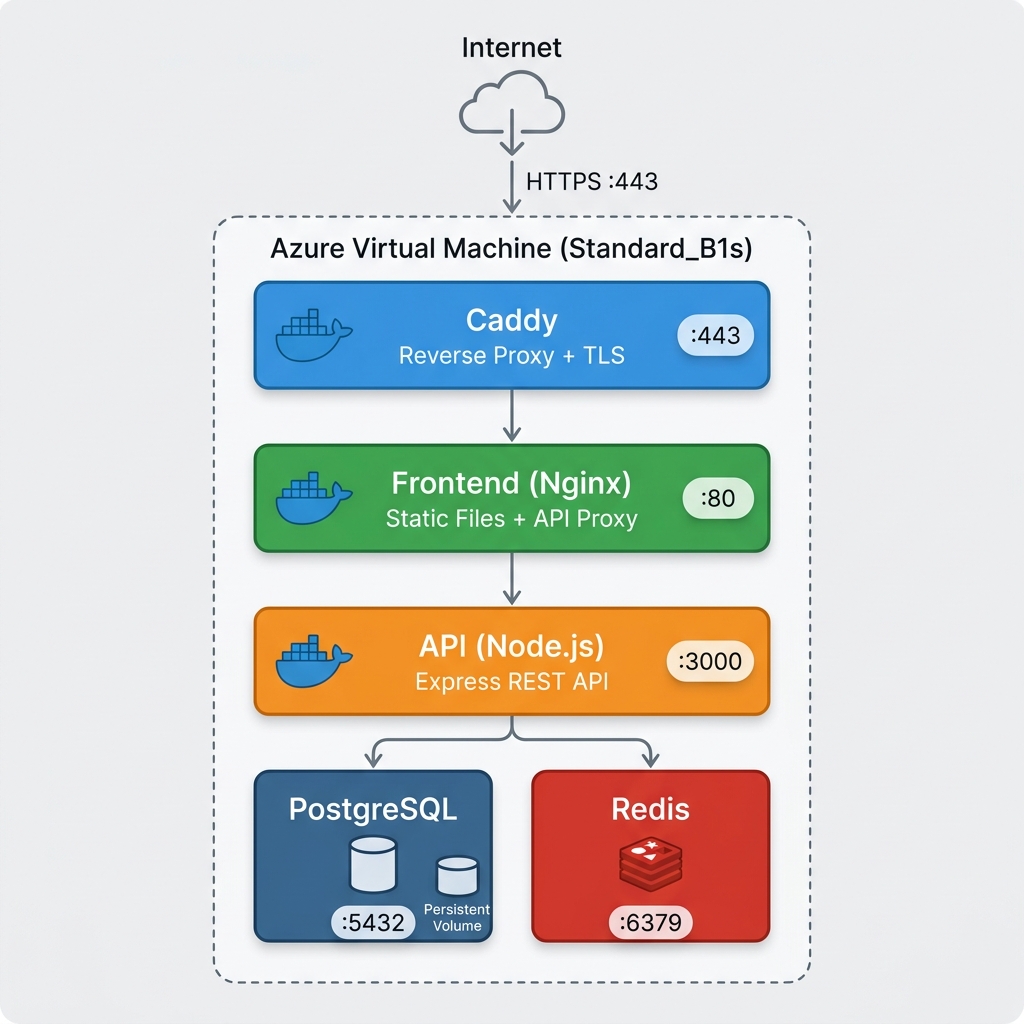
🌐 Physical Network & Container Segmentation
graph TD
    subgraph Public Internet [🌐 Public Access Channel]
        Client([👤 End User Browser])
    end

    subgraph Azure VM Network Boundary [☁️ Azure virtual network VM]
        subgraph frontend-net [🌐 frontend-net subnet]
            Caddy[🔒 Caddy HTTPS Reverse Proxy]
            Nginx[⚡ Nginx Static Content Server]
            Node[🚀 Node.js Express API]
        end

        subgraph backend-net [🔒 backend-net Isolated Internal Network]
            PostgreSQL[(🗄️ PostgreSQL 16 DB)]
            Redis[(⚡ Redis Cache)]
        end
    end

    Client -- "HTTPS (443)" --> Caddy
    Caddy -- "HTTP (80)" --> Nginx
    Nginx -- "Proxy API Requests" --> Node
    Node -- "Query / Write" --> PostgreSQL
    Node -- "Get / Cache" --> Redis

    %% Styling
    style Client fill:#eceff1,stroke:#37474f,stroke-width:2px,color:#333
    style Caddy fill:#00A2C9,stroke:#fff,stroke-width:2px,color:#fff
    style Nginx fill:#009639,stroke:#fff,stroke-width:2px,color:#fff
    style Node fill:#339933,stroke:#fff,stroke-width:2px,color:#fff
    style PostgreSQL fill:#4169E1,stroke:#fff,stroke-width:2px,color:#fff
    style Redis fill:#DC382D,stroke:#fff,stroke-width:2px,color:#fff
    style frontend-net fill:#e3f2fd,stroke:#1e88e5,stroke-width:2px,stroke-dasharray: 5 5
    style backend-net fill:#ffebee,stroke:#e53935,stroke-width:2px,stroke-dasharray: 5 5
📦 Container Services Registry
| Service | Port Configuration | Technology Badge | Primary Architectural Role |
|---|---|---|---|
| Caddy Proxy | 443 (HTTPS)80 (HTTP) |
 |
SSL/TLS Entrypoint. Negotiates modern TLS 1.3 via Let's Encrypt and forwards clean traffic to Nginx. |
| Frontend Nginx | 80 (Internal) |
 |
Web Server. Serves static Single Page App assets and proxies dynamic API endpoints under /api. |
| Backend API | 3000 (Internal) |
 |
Express Core. Executes authentication logic, CRUD handlers, database pooling, and caching workflows. |
| PostgreSQL DB | 5432 (Internal) |
 |
Persistence Engine. Implements relational storage using PostgreSQL 16. Data is persistent via host volumes. |
| Redis Cache | 6379 (Internal) |
 |
Caching Layer. Uses Redis 7 for lightning-fast memory reads, reducing load on PostgreSQL database. |
⚡ Caching Sequence & Read-Write Lifecycle
To optimize database throughput, the Node.js API implements an automated Cache-Aside Caching Strategy:
sequenceDiagram
    autonumber
    actor User as 👤 User Browser
    participant API as 🚀 Express API
    participant Redis as ⚡ Redis Cache
    participant DB as 🗄️ PostgreSQL DB

    Note over User, Redis: READ PATH (GET /api/tasks)
    User->>API: Request Tasks
    API->>Redis: Check key "tasks"
    alt Cache Hit (Fast Path)
        Redis-->>API: Return tasks JSON (1ms)
        API-->>User: Deliver Tasks (Instant)
    else Cache Miss (Slow Path)
        Redis-->>API: Null
        API->>DB: Query Tasks Table (50ms)
        DB-->>API: Return task records
        API->>Redis: Save tasks JSON (TTL 30s)
        API-->>User: Deliver Tasks
    end

    Note over User, DB: WRITE PATH (POST /api/tasks)
    User->>API: Create New Task
    API->>DB: Insert task record
    DB-->>API: Success
    API->>Redis: Invalidate "tasks" key (DEL)
    API-->>User: Success (Cache Cleaned)
🚀 Deployment & Decommissioning
Important
Ensure the Azure CLI is installed and you are logged in (
az login) with an active subscription before running the orchestration tools.
🛠️ One-Command Provisioning
# 1. Clone the repository
git clone git@git.kemt.fei.tuke.sk:gs699he/zkt26.git
cd zkt26/sk1

# 2. Setup your secure environment credentials
cp env.example .env
nano .env   # Input a strong POSTGRES_PASSWORD

# 3. Provision all cloud infrastructure and launch app
./prepare-app.sh
⚙️ Administration & Orchestration Panel
Our custom orchestration scripts provide total CLI control over the production environment without ever needing the Azure Web UI:
| Script Name | Icon / Badge | CLI Command | Functional Description & Security Integration |
|---|---|---|---|
| Provisioner | prepare-app |
./prepare-app.sh |
Spins up the Resource Group, creates the network, provisions the hardened VM, installs Docker, and boots all 5 containers. |
| Backup Manager | backup-db |
./backup-db.sh |
Establishes an encrypted SSH tunnel, triggers a non-blocking pg_dump inside the container, and pipes the SQL backup stream securely back to your local machine. |
| Log Terminal | view-logs |
./view-logs.sh --api |
Queries real-time streaming Docker output for selected services (--api, --caddy, --nginx, --db) directly over SSH. |
| Decommissioner | remove-app |
./remove-app.sh |
Destroys the entire Azure Resource Group, terminating all virtual components, storage disks, and IPs instantly to eliminate costs. |
📂 View Hardened Repository Tree (Click to Expand)
sk1/
├── api/                       # Express Backend API & DB connection pool
│   ├── src/                   # Source files (server, database configurations)
│   └── package.json           # Node dependencies list
├── frontend/                  # Single-Page Web Frontend
│   ├── index.html             # Sleek client UI entry point
│   ├── index.css              # Glassmorphic custom CSS styling
│   └── nginx.conf             # Local Nginx routing setup
├── caddy/                     # Caddy configuration
│   └── Caddyfile              # Let's Encrypt TLS setup & reverse-proxy mapping
├── db/                        # Database schemas
│   └── init.sql               # Seeding script for Task Database
├── docs/                      # TeX documentation and static assets
│   ├── architecture.png       # Visual architecture diagram
│   ├── documentation.tex      # Main exam LaTeX document source
│   └── documentation.pdf      # Compiled exam PDF report
├── prepare-app.sh             # Azure Deployment Orchestration Shell Script
├── remove-app.sh              # Azure Resource Deletion Cleanup Script
├── backup-db.sh               # Remote Secure Database Snapshot Tool
├── view-logs.sh               # Remote Secure Logging Client
├── cloud-init.yaml            # VM initialization cloud config directive
├── docker-compose.yaml        # Standard Docker Multi-Container Compose Config
├── .env                       # Dynamic local settings (Gitignored)
└── env.example                # Variable template for environment parameters
💰 Cloud Resource Cost Modeling
Projected cloud billing estimation modeled around 1,000 active daily users storing up to 50 GB of relational information inside the Azure node:
| Cloud Component | Capacity Specification | Monthly Cost | Annual Cost | Budget Status |
|---|---|---|---|---|
| 🎛️ Compute VM | Standard_B2ts_v2 (2 vCPUs, 1 GB RAM, Burst capable) | $14.16 | $169.92 | Covered by Azure Credit |
| 💾 Storage SSD | 64 GB Premium SSD P6 (Sustained High IOPS) | $9.60 | $115.20 | Covered by Azure Credit |
| 🌐 Networking | Dedicated Public Static IPv4 Address | $3.00 | $36.00 | Covered by Azure Credit |
| 📉 Bandwidth | ~30 GB/Month Outbound Transfer | $0.00 | $0.00 | Free Tier |
| 🔑 Security | Let's Encrypt ACME SSL/TLS Provisioning | $0.00 | $0.00 | Fully Free |
| 📈 Cumulative Total | Ready for Production & Scaling | $26.76 | $321.12 | 100% Student-Credit Eligible |
🔒 Security Hardening Matrix
| Security Threat | Implemented System Defense | Architectural Detail |
|---|---|---|
| Eavesdropping / MITM | Enforced TLS 1.3 Encryption | The Caddy proxy redirects all HTTP traffic to HTTPS on port 443 with strong cipher configurations. |
| Unauthorized DB Access | Total Port Firewallowing | Only Caddy ports (80, 443) and SSH (22) are exposed. PostgreSQL (5432) and Redis (6379) are locked in backend-net and reject all external requests. |
| Credential Disclosure | Runtime Environment Injection | Database passwords are kept entirely out of code and injected dynamically at compose-time from a secure .env file. |
| Container Downtime | Automated Self-Healing Policies | All services use restart: always in docker-compose.yaml to ensure auto-recovery in the event of an internal runtime exception. |
| Data Loss / Host Corruption | Local Database Snapshotting | The administrative backup-db.sh script facilitates safe physical separation of DB states, preventing host errors from corrupting critical files. |
🤖 AI Usage Declaration
- Google Antigravity (Gemini 2.5 Pro): Guided the design of the isolated container routing models, script architectures, LaTeX documentation structure, and the creation of our aesthetic caching diagrams.
- Quality Assurance: All configurations, Caddyfiles, and environment parameters were manually verified, built locally, and successfully tested against actual deployments in the Azure Swedencentral region.
Technical University of Košice — KEMT FEI — Cloud Technologies — 2026