| .. | ||
| api | ||
| caddy | ||
| db | ||
| docs | ||
| frontend | ||
| .gitignore | ||
| backup-db.sh | ||
| cloud-init.yaml | ||
| docker-compose.yaml | ||
| env.example | ||
| prepare-app.sh | ||
| README.md | ||
| remove-app.sh | ||
| view-logs.sh | ||

Task Manager — Cloud Deployment (SK1)
🌐 Live Application: https://taskmanager-gs699he.swedencentral.cloudapp.azure.com
📖 Application Description
The Task Manager is a full-stack web application designed for creating, tracking, updating, and deleting tasks. It is intended for individuals needing a responsive, simple interface for personal productivity. It features a modern Single-Page Application frontend, a Node.js REST API backend, and uses PostgreSQL for reliable data storage and Redis for high-speed caching.
☁️ Cloud & Architecture Description
The application is deployed to Microsoft Azure using the "Azure for Students" subscription.
- Public Cloud: Microsoft Azure (deployed in the
swedencentralregion). - Cloud Services: Azure Virtual Machines (Standard_B2ts_v2), Azure Public IP Addresses, Azure Network Security Groups (allowing ports 80/443/22).
- Docker Objects: Docker Compose orchestration, 5 distinct Docker containers.
- Persistent Volumes: Two Docker named volumes (
pgdataandredisdata) to ensure data is preserved across container restarts.caddy_dataandcaddy_configfor TLS certificates. - Databases: PostgreSQL 16 serves as the primary relational database, and Redis 7 acts as an in-memory cache.
🏗️ Architecture
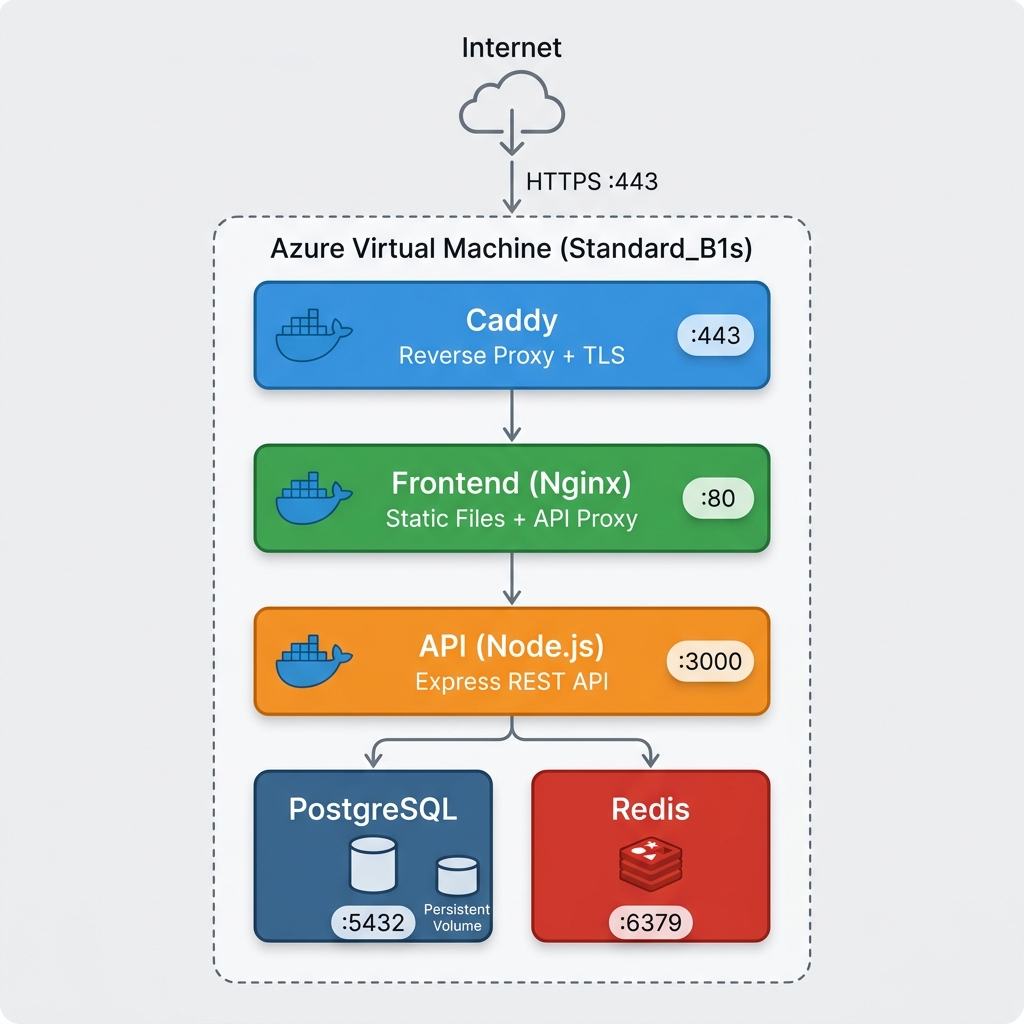
| Container | Image | Port | Purpose |
|---|---|---|---|
| Caddy | caddy:2-alpine | 443, 80 | Reverse proxy + automatic HTTPS (Let's Encrypt) |
| Frontend | nginx:alpine | 80 | Static files + API reverse proxy |
| API | node:20-alpine | 3000 | Express REST API (CRUD) |
| PostgreSQL | postgres:16-alpine | 5432 | Persistent relational database |
| Redis | redis:7-alpine | 6379 | In-memory cache |
🚀 Quick Deploy & Usage Instructions
Pre-conditions for scripts
The prepare-app.sh and remove-app.sh scripts require the following conditions:
- You must be authenticated to Azure via the Azure CLI (
az login). - You must have an active "Azure for Students" (or Pay-As-You-Go) subscription.
- The
.envfile must exist and contain the required variables (specificallyPOSTGRES_PASSWORD). - The system running the script must have
sshandscpinstalled.
Deployment Steps
# 1. Login to Azure
az login

# 2. Clone the repository
git clone git@git.kemt.fei.tuke.sk:gs699he/zkt26.git
cd zkt26/sk1

# 3. Configure environment
cp env.example .env
nano .env    # Set POSTGRES_PASSWORD

# 4. Deploy (Fully automated, no web GUI interaction required)
./prepare-app.sh
How to View and Use the Application
- Open a web browser.
- Navigate to the HTTPS URL provided at the end of the deployment script (e.g.,
https://taskmanager-gs699he.swedencentral.cloudapp.azure.com). - You will see the Task Manager interface where you can add new tasks, mark them as complete, and delete them. The HTTPS certificate is automatically negotiated and secured.
🗑️ Remove (after exam)
./remove-app.sh # Deletes entire resource group (VM, IP, disk)
💾 Backup & Access Logs
How to Perform a Data Backup
You can backup the database from the cloud server to your local machine by running:
./backup-db.sh
This script securely connects to the VM, executes pg_dump, and downloads a .sql backup file to your local backups/ folder.
How to View Access Records from the Internet
To view the HTTP/HTTPS access logs of traffic coming from the internet, run the following script:
./view-logs.sh --caddy
This securely fetches the proxy logs from the Caddy container, showing IP addresses, request paths, and HTTP statuses.
📁 Project Structure & Uploaded Files
prepare-app.sh: Shell script for automatically provisioning the Azure VM, opening ports, installing Docker, uploading files, and starting all services.remove-app.sh: Shell script to completely delete the Azure Resource Group, eliminating the application and all associated costs.backup-db.sh: Script to connect to the running database container via SSH and download a.sqlbackup.view-logs.sh: Script to securely read Docker container logs (including internet access logs) from the Azure VM.docker-compose.yaml: The main configuration file defining the 5-container architecture, networking, and volumes.cloud-init.yaml: Cloud-init configuration used by Azure during VM creation to automatically install Docker.env.example: Template for environment configuration.api/: Contains the Node.js backend source code (server.js,db.js),package.json, and theDockerfilefor the API container.frontend/: Contains the static web files (index.html,style.css,app.js), Nginx reverse-proxy configuration (nginx.conf), and theDockerfile.caddy/Caddyfile: Configuration for the Caddy web server to handle reverse-proxying and automatic TLS/HTTPS.db/init.sql: SQL script containing the initial database schema to create the tasks table.
⚙️ Configuration Description
The application relies completely on file-based and environment-based configuration:
- Environment Variables (
.env): Used to configure database passwords, hostnames, and Azure deployment parameters (Location, VM Size, DNS). Secrets are injected dynamically and excluded from Git. - Docker Compose (
docker-compose.yaml): Declares container dependencies, restart policies (restart: always), and volume mounts. - Nginx & Caddy configs: Define routing rules without requiring manual web interface interaction.
| Variable | Description |
|---|---|
POSTGRES_PASSWORD |
Database password (Secret, not in git) |
AZURE_RESOURCE_GROUP |
Azure resource group (taskmanager-rg6) |
AZURE_LOCATION |
Azure region (swedencentral) |
AZURE_VM_SIZE |
VM size (Standard_B2ts_v2) |
AZURE_DNS_LABEL |
DNS label for public URL |
💰 1-Year Cost Analysis (1000 users/day & 50GB Database)
If the application scales to 1,000 daily users and requires 50 GB of persistent storage, the infrastructure costs for one year of operation on Azure are calculated as follows:
| Cloud Resource | Price / Billing Interval | Total Annual Cost |
|---|---|---|
| Azure VM (Standard_B2ts_v2) | ~$14.16 / month | $169.92 |
| Disk (64 GB Premium SSD P6) | ~$9.60 / month | $115.20 |
| Public IPv4 Address | ~$3.00 / month | $36.00 |
| Bandwidth (Data Transfer Out) | First 100 GB/month is Free. 1000 users × 1MB = 1GB/day ≈ 30 GB/month. | $0.00 |
| TLS/SSL Certificates (Let's Encrypt) | Free | $0.00 |
| Total Estimated Cost | ~$321.12 / year |
🔒 Security
- HTTPS enforced (Caddy + Let's Encrypt)
- Databases on isolated Docker network (
backend-net) - Secrets via
.env(gitignored) - Security headers in Nginx
- Auto-restart on failure
🤖 External Resources & Generative AI Usage
- Google Antigravity (Gemini 2.5 Pro): Used via the Deepmind MCP IDE integration as a pair-programming assistant.
- Method of Use: The generative model was used to rapidly scaffold the
docker-compose.yaml, generate the architecture diagram, scaffold shell scripts (prepare-app.sh,backup-db.sh), and write the LaTeX report structure. - Verification: All outputs were thoroughly reviewed, manually tested, and adjusted to guarantee security and strict compliance with assignment requirements. No sensitive API keys or credentials were sent to or generated by the AI in a public context.
Technical University of Košice — KEMT FEI — Cloud Technologies — 2026